
You spent years building your medical expertise. You invested in a clinic, hired staff, and opened your doors. But when a potential patient Googles you at 10 PM on a Tuesday, what do they find? If your website is slow, confusing, or looks like it was built in 2015, that patient is going to click away — and book with someone else. The hard truth is this: if you don’t have a patient-friendly clinic website, that first impression is already working against you.”
The hard truth is this: your clinic website is often your first point of contact with patients. Before they ever walk through your door, they’ve already formed an opinion about your practice — based entirely on what they experienced online. A patient-friendly clinic website isn’t a luxury. It’s a clinical necessity for your practice’s growth.
At Tatak Mo, we’ve audited dozens of healthcare and wellness websites, and we consistently see the same gaps. So we built this 10-point checklist to help you identify what’s working, what’s broken, and what’s costing you patients, right now.
Why a Patient-Friendly Clinic Website Is No Longer Optional
Consider the numbers. According to the Pew Research Center, over 80% of internet users have searched for health information online. And research from Google’s Think with Google shows that one in three consumers turns to the internet before consulting a healthcare provider.
That means your website isn’t competing against other clinic websites. It’s competing against WebMD, Mayo Clinic, and YouTube health channels. If your site doesn’t immediately communicate trust, clarity, and ease, patients leave.
We’ve written about this in detail in “The Trust Gap in Healthcare Marketing,” where we explain why qualified professionals still lose patient inquiries. A poorly structured website is one of the biggest culprits. And in “The Anatomy of a Trustworthy Professional Profile”, we break down how credibility is quietly built (or broken) through your digital presence.
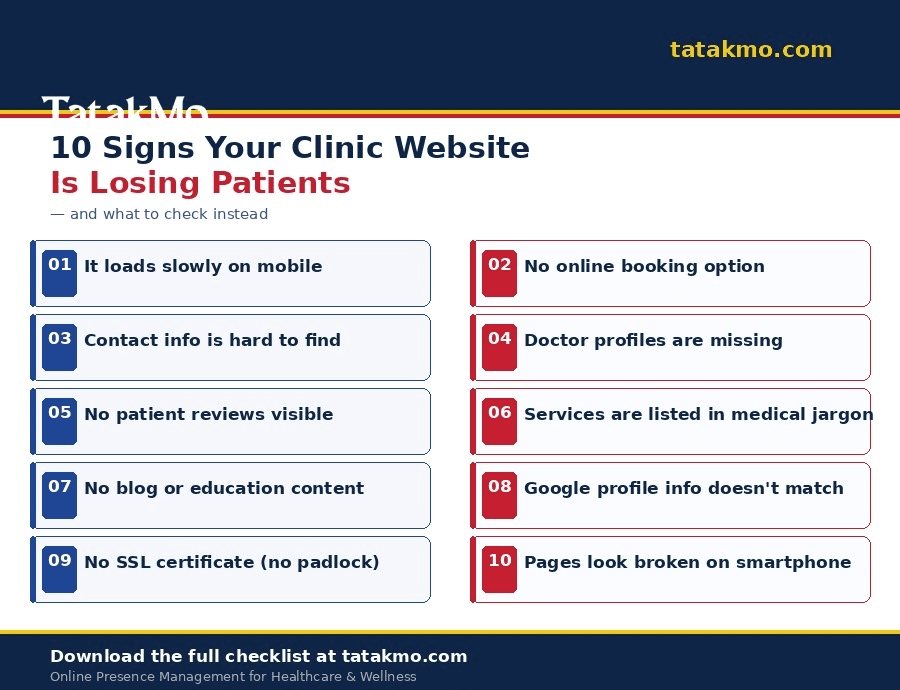
The 10-Point Checklist for a Patient-Friendly Clinic Website
Let’s go through each must-have element. Use this as an audit tool — read each item, then check whether your own site delivers.
✅ 1. Mobile-First Design That Actually Works
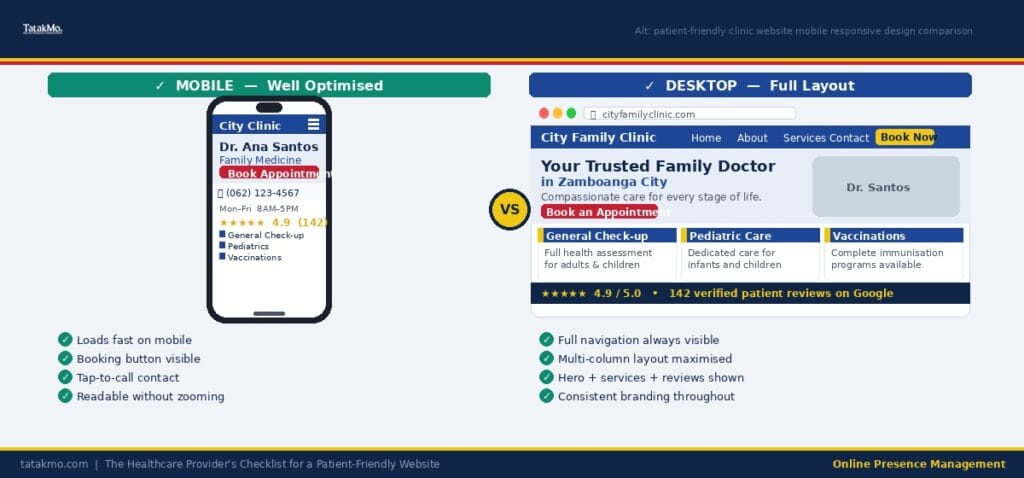
More than 60% of healthcare-related searches happen on mobile devices (Statista, 2024). If your website doesn’t display correctly on a smartphone — distorted layouts, hard-to-tap buttons, text that’s too small — you’re immediately failing a majority of your prospective patients.
A patient-friendly clinic website must load cleanly and intuitively on any screen size. Navigation should be thumb-friendly, contact information should be tappable, and your booking button should be visible without scrolling.
Quick audit check: Pull out your phone, visit your website, and ask yourself: “Would a first-time patient know exactly what to do next?”
✅ 2. Fast Load Speed (Under 3 Seconds)
Patients are not patient with slow websites. Google’s Core Web Vitals research shows that 53% of mobile users abandon a site if it takes more than 3 seconds to load. In healthcare, where patients are often anxious and searching quickly, a sluggish site translates directly to lost appointments.
Common culprits for slow clinic websites include uncompressed images, outdated themes, and too many plugins. If you’re on WordPress (which many clinics use), tools like GTmetrix or Google PageSpeed Insights can show you exactly what’s slowing you down.
We cover the broader picture in “How an Updated Online Presence Attracts More Patients” — including why technical performance is inseparable from patient acquisition.
✅ 3. Clear, Visible Contact Information
This one sounds obvious — and yet it’s one of the most common failures we see. Patients should be able to find your phone number, address, and clinic hours within seconds of landing on your homepage. No scrolling, no hunting through menus.
Your contact information should appear:
- In the header (top of every page)
- On a dedicated Contact page
- Embedded in Google Maps on your website
- In the footer of every page
Make phone numbers clickable (tel: links) for mobile users. Include your clinic’s WhatsApp number if you use it — many Filipino patients prefer messaging over calling.
✅ 4. Online Appointment Booking or Inquiry Form
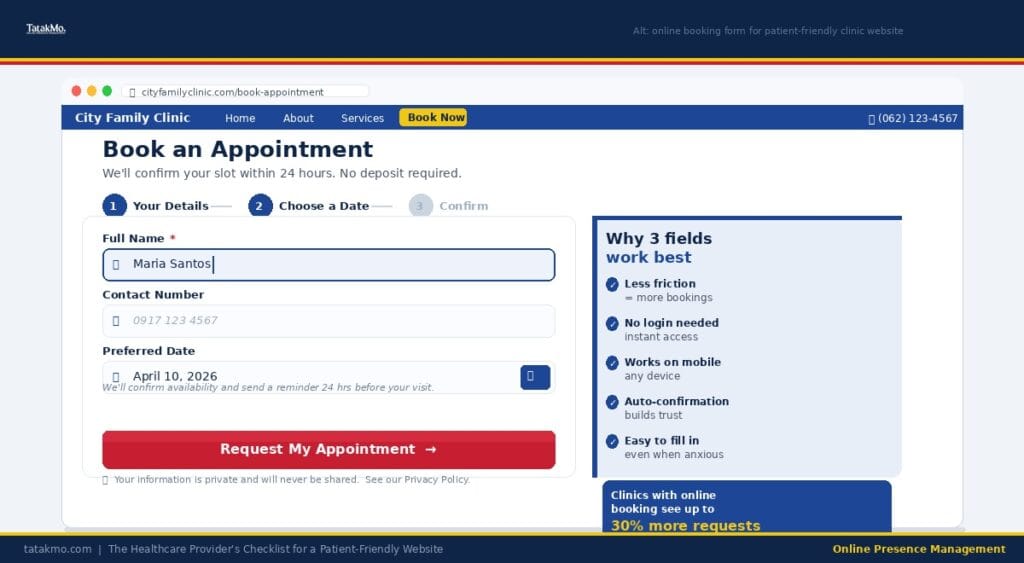
A patient who can’t book an appointment at 11 PM — when they’re finally not at work — will often just not book. Online booking, or at a minimum, a simple inquiry form, is now a baseline expectation for a patient-friendly clinic website.
Tools like Calendly, ZocDoc (for international clinics), or even a simple Contact Form 7 on WordPress can handle this. The key is reducing friction: fewer fields, clear confirmation messages, and an immediate response (even if it’s an automated acknowledgment).
We’ve seen this drive measurable results firsthand, detailed in “Boost Your Clinic’s Growth with a Healthcare Online Presence Audit”.
✅ 5. Doctor or Practitioner Profiles That Build Trust
Patients want to know who will be treating them. A professional bio with a genuine photo, credentials, specialization, and even a short personal statement goes a long way toward building the trust that turns website visitors into booked patients.
Avoid generic stock photos of doctors in white coats. Use real images of your actual team. Authenticity matters — as we explored in “Clarity Is the Competitive Advantage Most Healthcare Professionals Ignore”, patients are increasingly skilled at detecting inauthenticity online.
Include: medical degree and institution, years of experience, specializations, languages spoken (crucial in multilingual communities like the Philippines), and any advocacy or community work.
✅ 6. Patient Education Content (Not Just Marketing Copy)
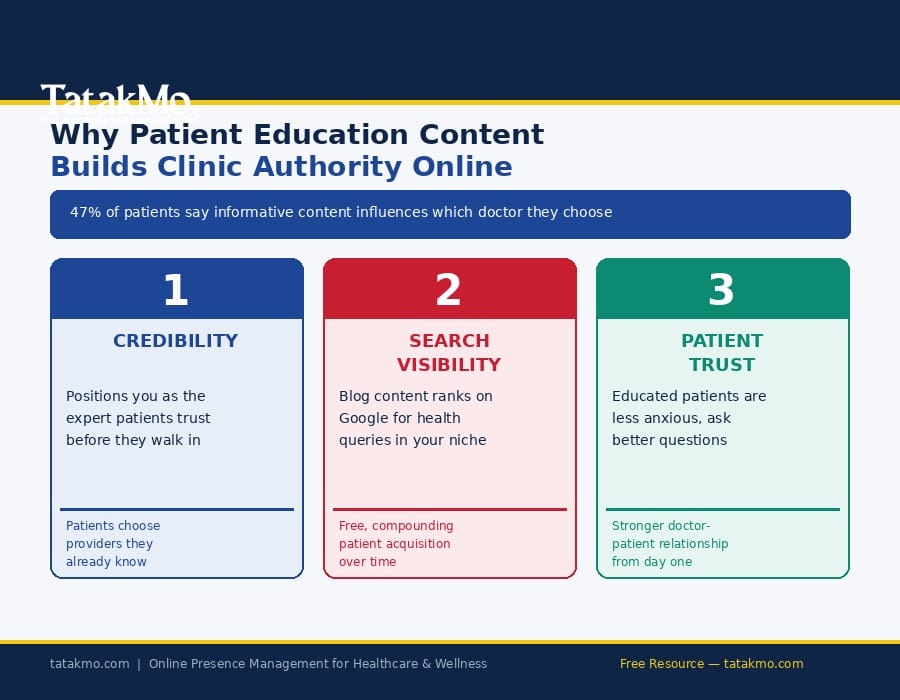
One of the most underutilized trust-builders for clinic websites is educational content. Not sales copy — actual health information that helps patients make informed decisions.
This could be a blog with articles on common conditions you treat, an FAQ section addressing patient concerns, or explainer videos. The World Health Organization has long advocated for digital health literacy, and clinics that produce credible patient education content build authority that no amount of advertising can buy.
This is a core reason we invest heavily in content at Tatak Mo — we wrote about this in “The Proven Way Patient Education Builds Trust in Healthcare”.
✅ 7. Visible Patient Reviews and Testimonials
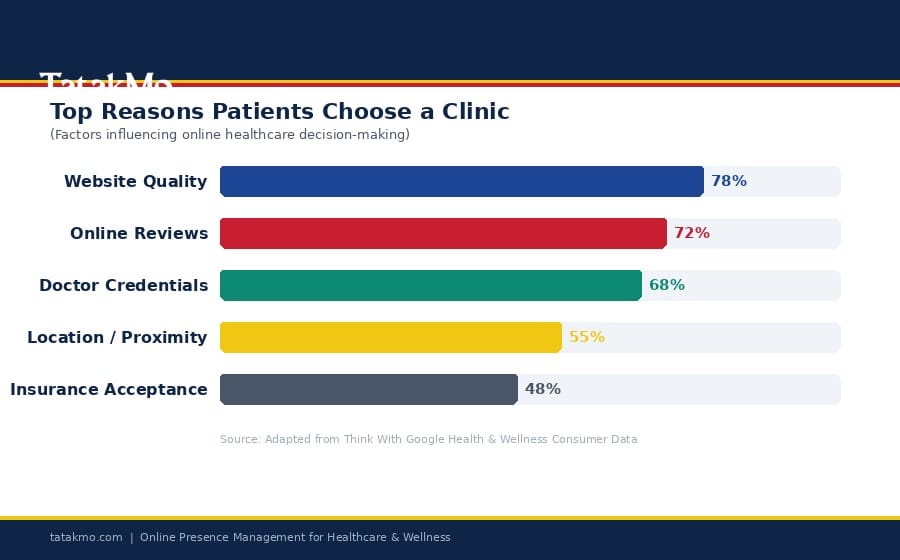
Social proof is medicine for hesitation. When a prospective patient is on the fence between two clinics, genuine patient reviews — displayed prominently on your website — can be the deciding factor.
Embed your Google Business Profile reviews directly on your site if possible. If you have video testimonials, even better. According to the Journal of Medical Internet Research, patient reviews significantly influence healthcare decision-making, particularly for new patients unfamiliar with your practice.
Don’t let reviews live only on Google or Facebook. Bring them onto your website. And make it easy for satisfied patients to leave new ones. We expanded on this in “9 Proven Ways to Improve Your Clinic Online Presence Fast”.
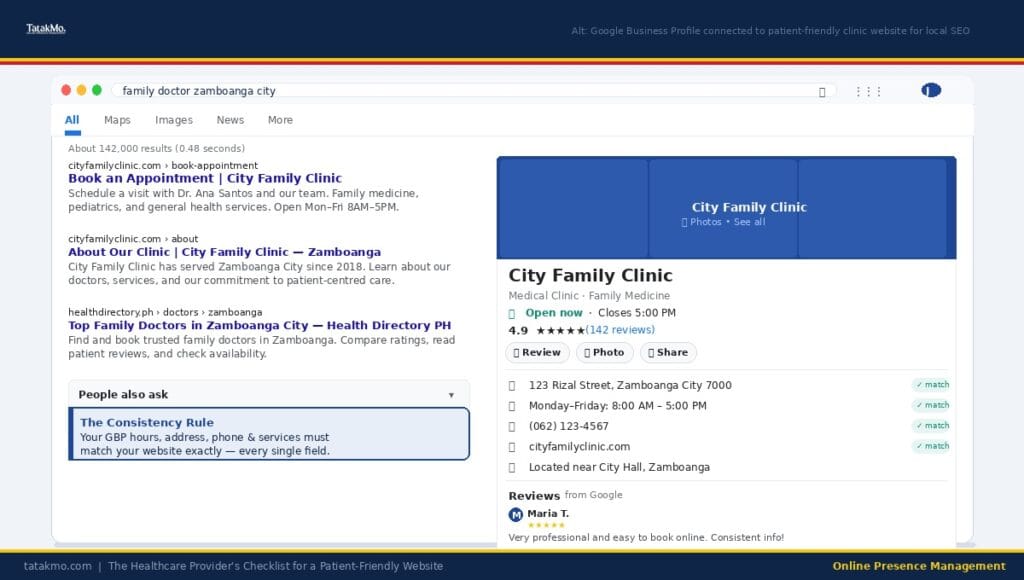
✅ 8. A Google Business Profile That Matches Your Website
Your website and your Google Business Profile need to tell the same story. Mismatches in operating hours, address, contact numbers, or service descriptions create confusion — and Google’s local search algorithms penalize inconsistency.
Your Google Business Profile is essentially an extension of your website for local search. If a patient finds you on Maps and then visits your site to confirm details, everything must match perfectly.
This is also tied to your Local SEO performance. We cover the specifics in “Local SEO for Healthcare: Get More Patients from Search” and “Maximize Bookings Through Google Business Profile”.
✅ 9. Clearly Listed Services with Plain-Language Descriptions
Medical jargon is the enemy of the patient-friendly clinic website. Your Services page should describe what you offer in language your patients actually use — not the clinical terminology you learned in medical school.
For each service, include: what it is (in plain language), who it’s for, what patients can expect during the procedure, approximate duration, and how to book. This reduces pre-appointment anxiety and cuts down on unnecessary phone inquiries.
Example: Instead of “Endoscopic Mucosal Resection,” lead with “Early-Stage Colon Cancer Removal — a minimally invasive procedure that…” and include the clinical term for SEO purposes.
✅ 10. SSL Security and a Privacy Policy (HIPAA/Data Compliance Considerations)
Every website today should have an SSL certificate (the padlock in the browser bar). Beyond basic security, clinic websites that collect patient data — through booking forms, inquiry forms, or chat widgets — need a clear Privacy Policy and, depending on your market, must consider compliance frameworks like HIPAA (for US-based clinics) or the Philippine Data Privacy Act of 2012.
Patients are increasingly privacy-conscious. The National Privacy Commission of the Philippines provides guidance for healthcare organizations on data handling obligations. Displaying a privacy policy builds trust and protects your practice.
This connects to the broader conversation we’ve had around trust and digital credibility in “The 2026 Digital Presence for Healthcare and Wellness Professionals”.
Quick-Reference Summary: The 10 Must-Haves
Use this table as your audit dashboard:
Must-Have Element
Why It Matters
Your Status
1. Mobile-First Design
60%+ of searches are on mobile
☐ Done / ☐ Needs Work
2. Fast Load Speed
53% abandon slow sites
☐ Done / ☐ Needs Work
3. Clear Contact Info
Patients need immediate access
☐ Done / ☐ Needs Work
4. Online Booking/Form
Reduces friction to appointment
☐ Done / ☐ Needs Work
5. Doctor Profiles
Builds trust before first visit
☐ Done / ☐ Needs Work
6. Patient Education Content
Authority + organic search traffic
☐ Done / ☐ Needs Work
7. Patient Reviews/Testimonials
Social proof drives decisions
☐ Done / ☐ Needs Work
8. Google Business Profile Match
Local SEO + consistency
☐ Done / ☐ Needs Work
9. Plain-Language Service Descriptions
Reduces confusion + anxiety
☐ Done / ☐ Needs Work
10. SSL + Privacy Policy
Reduces confusion + anxiety
☐ Done / ☐ Needs Work
Bonus: What Makes a Clinic Website "Patient-Friendly" Beyond the Checklist
The 10 items above are your foundation. But the clinics that truly stand out go one step further — they design their websites with empathy at the center.
Think about your patient’s emotional state when they visit your site. They’re often anxious, uncertain, or dealing with something that already worries them. Every word, every design choice, every friction point is felt more acutely in this context.
Ask yourself: Does my website feel like walking into a clean, welcoming clinic? Or does it feel like navigating a confusing hospital corridor with no signs?
The language you use matters. Avoid fear-mongering CTAs like “Book Now Before It’s Too Late.” Favor reassuring language: “We’re here when you’re ready,” or “Start with a no-pressure consultation.”
Ready to Audit Your Clinic Website?
A patient-friendly clinic website isn’t built in a day — but identifying what to fix first can happen in an afternoon. Start with this checklist. Score yourself honestly. Then prioritize the two or three items that would have the biggest impact on your patient experience.
If you’d like a professional set of eyes on your website — someone who understands both the healthcare context and the digital strategy behind it — that’s exactly what we do at Tatak Mo. Our Healthcare Online Presence Audit gives you a clear picture of where you stand and a prioritized roadmap to get where you need to be.